
Well, here we are again after two months away from these devlogs! As mentioned in the previous one, I didn’t spend August working on Embers Tactics, but I made good progress throughout September, even with another project running alongside it. To make up for the wait, this devlog will be packed with details and visuals. On the agenda: the first cutscenes, redesigned interfaces, a complete battle loop, and a few systems unique to the game. Let’s get started!
The place of AI in Embers Tactics
Before showing you the game’s progress, I’d like to take a moment to talk about an important subject: how I use AI to create Embers Tactics. First of all, I’m far from being against AI, but that doesn’t mean I’m willing to cross every boundary with it.
From development assistance to coding agents
Ever since ChatGPT arrived in late 2022, I’ve found the tool fascinating and followed its evolution very closely. At first, I mostly used it as a development assistant: finding a solution to a problem quickly instead of spending hours digging through forums. A huge time saver, but still, above all, a tool.
Gradually, the models became capable of producing better code and solving increasingly complex problems. Then, from late 2025 onward, I started noticing a real change while using agents such as Claude Code, followed by Codex. They could access project files directly and work with far more autonomy than through their usual chatbot interfaces.
For a long time, you still had to supervise them constantly: review the code, test, and check everything, especially sensitive areas. Over the months, I experimented with several projects and learned how to use these agents better, establish good working methods, and configure them properly.
Today, the AI models are so capable and my setup so well configured that I’ve reached a point where I no longer review the code line by line. I mainly validate the result through actual testing: the behavior I expect from the game, the feeling I’m looking for, and so on. The amount of code produced has become absurd, and its quality exceeds what I could produce myself in the same time. So I prefer to focus my attention on the result.
At first, that made me a little sad, like many developers: I was losing the desire to write code myself when a tool could do it better and much faster. But working on Embers Tactics, and on other projects before it, completely changed my perspective.
For a start, the time saved is considerable, well beyond a twofold or threefold improvement in my case. Many technical limitations that could once have blocked the project are no longer obstacles. Even little details we might previously have abandoned because they took too much time for too little benefit can now be implemented very quickly. And while an agent is working, I sometimes even have the luxury of moving on to another task that requires more creativity or thought.
Without AI, Embers Tactics honestly probably wouldn’t have existed in the form I want. I wouldn’t have had all the necessary technical skills, or necessarily the patience to embark on such an ambitious project. And it remains very ambitious!
Keeping intention behind what we create
That said, I certainly don’t support everything done with AI, and my own use has limits. So far, I’ve only talked about code generation, which accounts for around 90% of my usage.
I hate things produced in a rush, the “AI slop,” the content with no real value generated by people who don’t understand what they’re doing or simply don’t care about doing it well. There’s an enormous difference between writing a prompt and immediately publishing the first result, and using AI with deliberate guidance, understanding the techniques, subtleties, and limitations, then adjusting, testing, and refining. All that additional work is precisely what makes the difference.
You can generate a website in five minutes today, but in my view it will have no soul, charm, subtlety, or truly human logic. The difference comes from the extra days or weeks spent revisiting interactions, moving elements, testing, removing what doesn’t work, and polishing the details.
For me, the same applies to AI-generated visuals and music, but also to ideas, gameplay mechanics, stories, and the overall feel of a game. In all those areas, AI still doesn’t rival humans in my eyes, and I sincerely hope that will always be the case.
These tools can be very useful for prototyping, finding inspiration, challenging an idea, or exploring a direction, but much less so for directly producing something final and creative. Beyond ethical questions and the origins of the training data, it’s very easy to lose consistency, intention, subtlety, and all the little details that give a work its own identity.
That’s why none of the final artwork in Embers Tactics, whether visual or audio, will be generated by AI. The game’s concept, gameplay, and characters also come from my own ideas and gaming experiences. I’ll always strive to work with talented people who can translate my vision and add their own artistic touch. That’s already the direction I’ve taken with the first three character illustrations created by Celestra.
Code generation is a different case in my view. Although I see an art to coding, it’s probably one of the fields most profoundly transformed by AI, and as an entrepreneur, I ultimately find that rather positive. A good developer will know how to use AI to go much further and much faster while doing things properly. Someone who isn’t a developer can also create interesting things they could never have made before, although generally with lower quality. And we’ll still be able to tell the difference between the two.
How I use it and what I commit to
In practice, I mainly use AI for coding. I also sometimes ask it to critique my ideas or brainstorm with me, to get another perspective and adjust them if necessary. Occasionally, I may generate temporary 2D assets as placeholders, simply to prototype an interface or test a layout before replacing them with assets made by an artist. This helps me move faster and focus on the essentials.
For transparency, whenever an artistic element shown in a devlog or present in the prototype has been generated by AI, I’ll say so. The goal remains for no AI-generated content, except code, to appear in the final version. And if you still find something I missed when the game releases: shame on me!
With that out of the way, if you haven’t already left or been shocked by my view of AI, let’s move on to the game’s progress!
An editor for directing cutscenes
When I returned to Embers Tactics at the beginning of September, I wanted to explore animation. The gameplay foundations had progressed well, an initial visual and functional prototype of the battle map was in place, and I’d started developing the opening of the story in writing.
So I wanted to work on cutscenes: those scenes that break up battles and menu navigation, usually before or after a fight, and help develop the story.
An editing timeline directly in Godot
The first thought that came to mind was how great it would be to have something like a video editor to create these scenes myself: move characters onto the tiles I choose, play an animation, display dialogue at a specific moment, add a pause, introduce an event, and so on.
Because generating cutscenes entirely through AI prompts would have been madness and an endless headache, if not impossible. Besides, it’s such an important creative part of the game that I wouldn’t want to make it that way. So I decided to use AI to build my own editing tool, integrated into the project directly in Godot! Here’s the result:
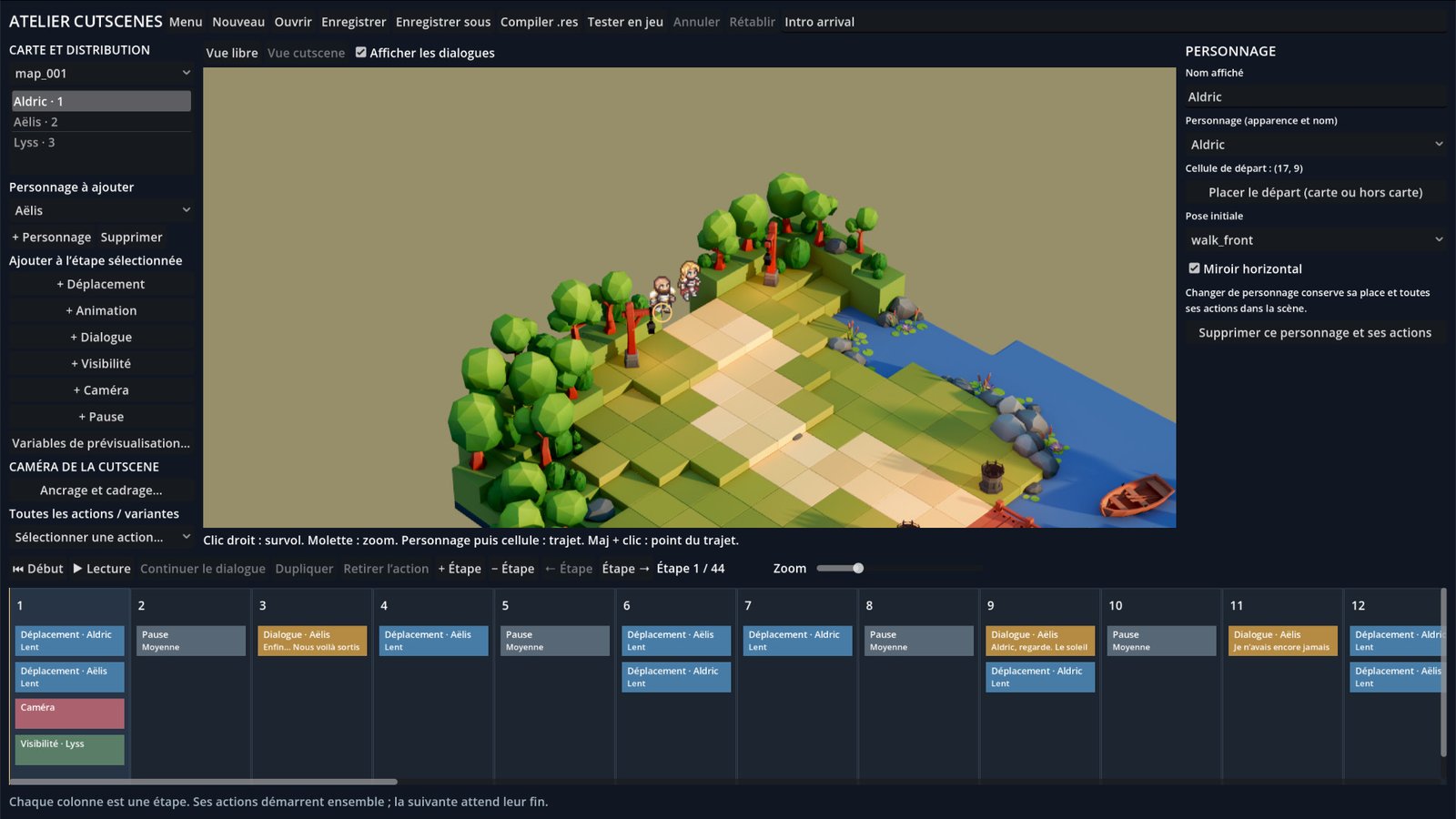
I can create a scene using whichever map I want, place the characters I choose wherever I need them, move them at different speeds, play dialogue and animations, add pauses, move the camera, and rearrange and preview elements in my timeline, just like in a proper editing application.
In practice, the cutscene simply stores information in a data file, using the map’s cell coordinates among other things. The game then reads that data in real time to play the animations in a logical, structured sequence. If I change the game’s visuals tomorrow while keeping the same map coordinates, the scene will work exactly as before without needing to be rebuilt.
That makes it easy to adjust a cutscene whenever I notice something isn’t right. I absolutely love this tool, and I’m going to have a lot of fun with the game’s many cutscenes! Playback is now integrated into the battle flow, with the option to skip scenes too.
A first glimpse of the introduction
In fact, I’d like to show you a small part of it right now!
Spoiler warning: although it’s probably not final, this cutscene reveals a passage from the beginning of the game. It doesn’t reveal a major event, but if you want to discover everything while playing, don’t watch the video. Some visible interface elements are AI-generated placeholders that will be replaced.
Show the work-in-progress introduction video
A softer camera that keeps the battlefield readable
While working on the editor and this cutscene, I also took the time to improve the camera. I didn’t want a purely isometric game: since I have a genuine 3D environment, I might as well make use of it.
I don’t necessarily enjoy having to rotate the camera to work around visual obstacles in a tactical RPG, as in the original FFT, for example. Players therefore can’t freely rotate it, but that doesn’t mean I have to lock it into a strictly isometric view.
Instead of an orthographic projection, where distance doesn’t change the apparent size of objects, I chose a perspective projection with an almost equally flattened appearance. Not entirely flat, though: I want to preserve a sense of perspective and the relief of the terrain without compromising tactical readability.
During cutscenes, I’ve also added a slight following delay, a small rebound, and a gentle drift when the camera stops. I find this gives the camera a much more pleasant and attractive movement than rigid tracking.
More compact and comfortable interfaces
Returning to the game after a month away, I realized my first interface iteration wasn’t good enough or sufficiently developed to feel pleasant, even as a prototype. Above all, the elements were too large and not particularly attractive.
So I decided to rework it completely to improve the feel. I also want to move forward with Celestra on this part, which meant first validating a prototype that was comfortable and functional.
In the current battle design, four interface elements play a major role: dialogue, the command menu, unit stats, and the preview of an ability’s damage and effects. I’ll show you and explain each one.
Of course, all of this is still a prototype for functionality and layout, not the final artwork. Some backgrounds and 2D assets shown here are AI-generated and will be recreated later.
Dialogue and its history
I’ve created a simple dialogue interface with a portrait on the left or right and the speaker’s name. You can choose between automatic dialogue progression and manual confirmation, and look back at earlier lines from the scene.

A responsive command menu
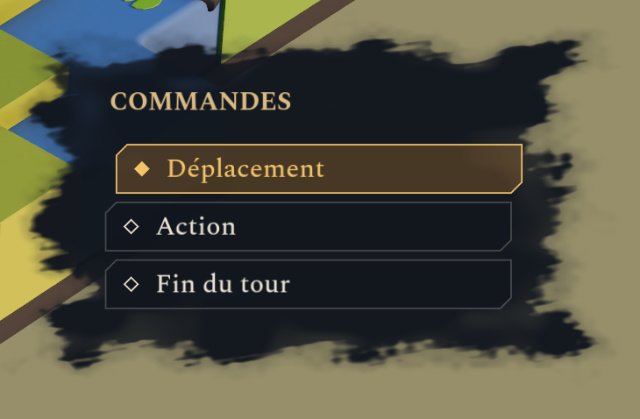
This menu handles our units’ actions and movement in battle. It’s one of the interfaces at the heart of the gameplay: I wanted it to look good and feel responsive without taking up too much space.
It floats on the right side of the screen, with its menus and submenus. Each action or movement also shows an immediate range preview, so you can plan what to do without having to select it first.
The essential information about each unit
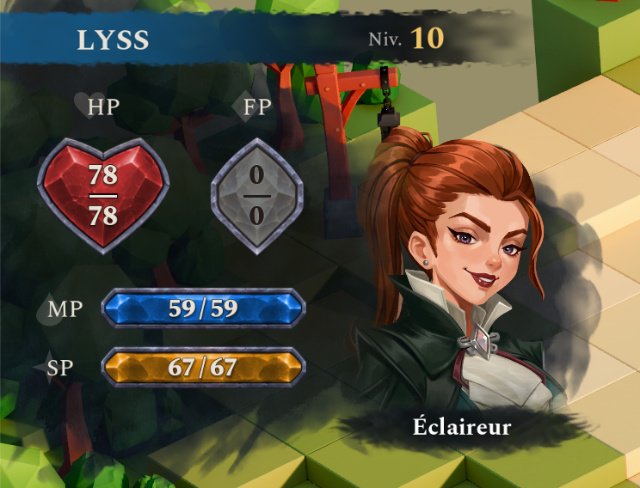
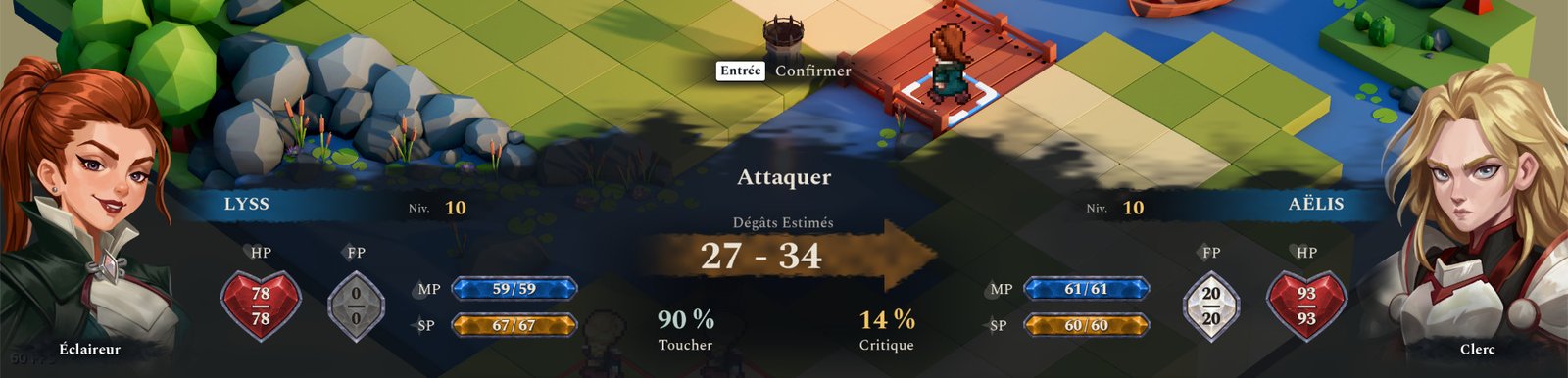
The stats panel and damage preview were the two parts that required the most work. Initially, I’d used an interface similar to those in FFTA and FFTA2, which I showed in the previous devlog: a fairly large block, displayed on the left or right depending on the targeted unit, containing all its information and stats.
The damage preview reused two of these blocks, adding the action’s outcome in the middle. The problem was that this took up an enormous amount of space and obscured much of the game. Since a unit panel is often visible on screen, I found it quite intrusive in practice.
In general, I don’t like cluttered interfaces and much prefer something clean. But information is essential in a tactical RPG, so you can’t strip too much away either. Especially since I’m aiming for a handheld console release and need to think about small-screen readability right from the start.
I’m currently playing Fire Emblem Fortune’s Weave, my first Fire Emblem, which I find absolutely incredible. Its interface is particularly well thought out. So I redesigned my stats panel to borrow some of its strengths: show only the essential information in a more compact block at the top left.
I’ll add an option, toggled with a button, to show or hide detailed information about the targeted unit. This keeps the overall interface compact while still letting you see more whenever you want.
A dedicated damage preview panel
However, this new design means the preview can no longer directly reuse the stats panel interface. So I created a second, dedicated interface: the information is gathered into a large block at the bottom of the screen, with the action’s damage and effects summarized in the middle.
Completing the battle loop
After adding a cutscene, several elements were still missing from a fully functional, playable gameplay loop. So I took the time to implement those steps, from preparation through to leaving the battle.
Seeing the upcoming turns
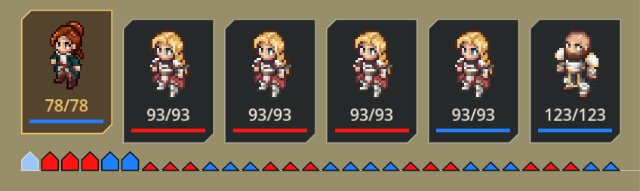
Turn order is an important part of a tactical RPG’s strategy. For this prototype, I clearly took inspiration from FFTA2.
You can see the next six unit turns in real time, with each side’s color. Targeting a unit on the battlefield also highlights it in the turn order, and performing an action can change that order. You can also navigate with L and R, which automatically targets the corresponding unit on the map.
Deploying units and ending a battle
The pre-battle unit deployment system is now in place. Each map has defined positions, and each battle can limit the number of units deployed. The deployment interface remains purely functional: its appearance hasn’t really been worked on yet.
I’ve also added enemy units, since there weren’t any before. They use the deployment tiles I define for the maps. For now, they skip their turns: I haven’t yet worked on their autonomous AI. That will be a major undertaking, and I prefer to refine the gameplay systems, abilities, and their interactions first. It will probably come much later.
Finally, when all allied or enemy units are KO’d, combat ends and you leave the battle. I’ve also added XP and AP rewards for victory. These are tied to a system specific to Embers Tactics, observation, which I’ll explain a little further down!
Preparing your party from the world map
An initial world map now lets you select an area and enter battle. I’ve also added a party menu, accessible from that map and during pre-battle deployment so you can prepare properly.
It lets you view your characters, change their order and the main party’s composition, arrange observers, and change equipment. A first inventory and equipment system is therefore functional too. Class changes and other features are also planned for these menus, but still need to be integrated.
For now, these are very basic, purely functional prototypes: I don’t yet have anything visually polished enough to show on that front.
Three systems to expand tactical choices
Although Embers Tactics draws on FFTA and FFTA2, I don’t want it to be a simple copy, which wouldn’t be interesting. I have plenty of ideas to spice up the game and make it less monotonous, repetitive, or frustrating, criticisms sometimes made of the different Final Fantasy Tactics games.
So I’d like to go into a little more detail about three systems whose foundations are already implemented.
Faith and the risk of building its gauge
I designed the faith system to add another tactical dimension to battles while fitting into the game’s lore. Faith is a gauge, much like MP or SP in other games of this kind. Its maximum value is a stat, and its current amount changes during battle.
A unit’s alignment is separate from this gauge: it can be positive, neutral, or negative, while the amount of faith always remains zero or above. Faith damage depends on the gap between the two gauge values after applying their alignment signs. A multiplier also accounts for the relationship between the two alignments. A positively aligned unit can therefore deal much more damage to a negatively aligned one, and vice versa.
The higher the gauge rises, the more dangerous it can become for the target, but also for its own user. It allows heavy damage against a unit of opposing faith while making us more exposed to enemy faith attacks. That makes it a tricky resource to keep high, designed to create tense situations in the middle or later stages of a battle, with the potential to turn the whole fight around.
Faith doesn’t fill up on its own. I want it to remain a tactical option you deliberately choose to engage with. Successfully attacking an enemy of the opposite alignment fills this initially empty gauge; specific abilities may also influence how it works. You can therefore deliberately build it up, or adapt your choices to avoid doing so.
Observers to help the reserves progress
I designed the observer system both to add another tactical dimension and to keep some units from falling behind in XP or abilities, without removing the incentive to field them directly.
A deployed unit can have observers: regular characters from our party who stay off the battlefield but receive XP and AP through observation when the battle is won. This lets them progress instead of simply being forgotten in reserve.
Eventually, observers will also provide character-specific passives to the units they accompany. Observation progression is already in place; the precise effects of those passives still need to be defined and implemented.
A spark to seize an opportunity during an action
The name is provisional. In the spirit of Sea of Stars, I’ve imagined a simple system to add a little excitement to battle actions and keep players attentive.
Every so often, a small spark appears during an allied attack. Pressing at the right moment improves the randomly selected power for that action: the game uses the upper half of the power range instead of the full range.
For example, with a weapon whose power varies from 10 to 20, success limits the roll to a value between 15 and 20. Damage is then calculated from that power; this doesn’t directly guarantee a particular number of damage points.
I don’t want to turn the game into a string of QTEs. The spark appears occasionally and remains entirely optional, with no penalty for missing it: the action simply uses its normal range.
Its frequency can also be part of a character’s stats and eventually become a factor in party builds. With highly unpredictable weapons that have particularly wide power ranges, investing in this spark could increase the chances of dealing heavy damage.
Continuing animations and reworking the environments
Beyond all that, I’ve also created and reworked the 2D pixel-art sprites for Aelis, Aldric, and Lyss. All three characters now have front-facing and back-facing walking animations. Pixel-art animation really does take a lot of time!
I’d like to add more animations soon: KO, weapon attacks, surprise, and even a unique signature animation for each character.
Finding vegetation with more volume
I’m still not happy with the game’s visual prototype, especially the trees. The main problem is that everything is too small: the trees and vegetation don’t convey enough of the cartoon and chibi look I’m after.
In July, and again this month, I spent a long time struggling with vegetation design. It’s something I often find unconvincing in games. Technical constraints frequently lead to textures applied to more or less distorted rectangles.
But Embers Tactics’ maps are enclosed and limited in size. I think that gives me a little more room than games with larger, more demanding environments, and may let me avoid relying on flat textured surfaces.
I’m still looking for a good solution. I particularly like how the vegetation seems to be made in LEGO Horizon, which I’ve never played: actual 3D, with leaves that have volume.
A new version of the map in Blender
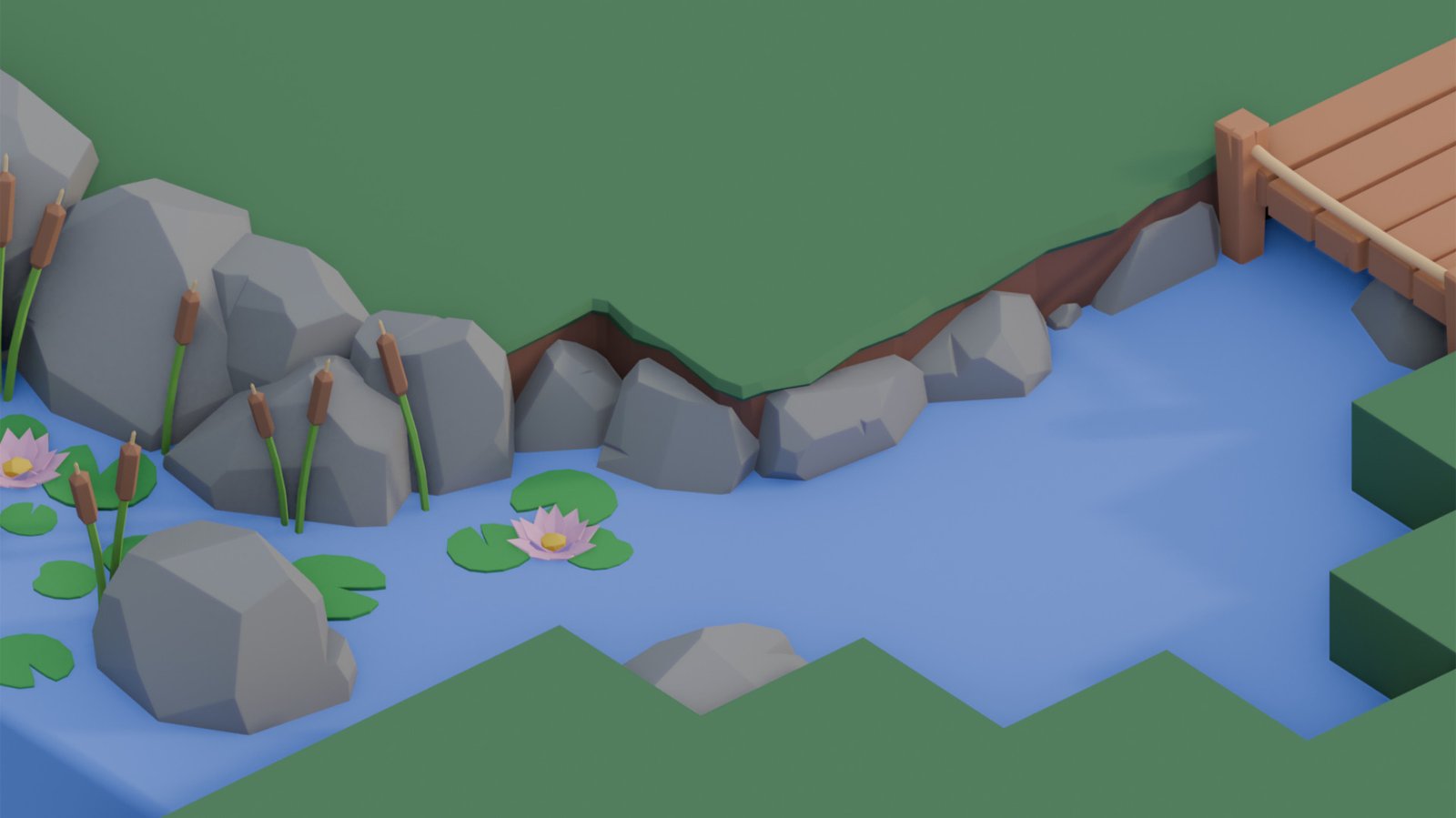
Alongside this, I’m working on a new 3D version of the battle map. The current one is very blocky and lacks both detail and volume. I’m also working on better-looking materials and, if I can find a solution I’m happy with, more developed vegetation.
I don’t want to get ahead of myself or share too many details, since the work has only just begun. But I can still show you a small, raw preview from Blender:
September recap and what comes next
It’s been a busy month back! Between the cutscene editor, the interface redesign, and the missing steps in the battle loop, the prototype is becoming more tangible. There’s still plenty to do, both to refine these systems and to find the visual result I want, but I can’t wait to keep bringing it all to life.
See you soon for more Embers Tactics!